
Local SEO Schema Markup for WordPress
Google can read your website, but it still has to work out what type of business you are, where you’re based and when you’re open. LocalBusiness schema spells those details out in a format search engines are built to understand.
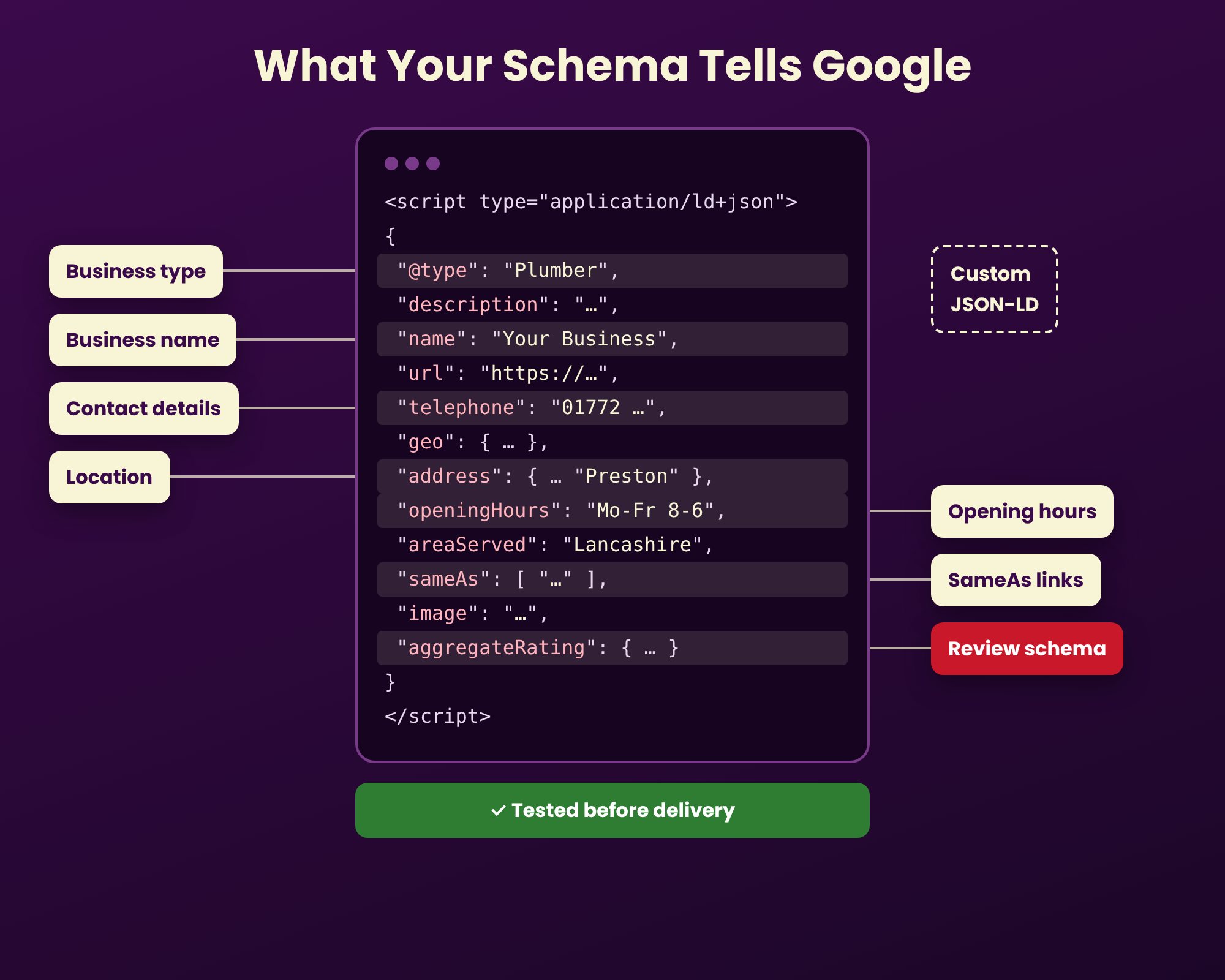
I write custom JSON-LD schema for your business, covering your business type, name, contact details, location, opening hours and SameAs links, then add it to your WordPress site and test it before delivery.
It’s designed to help Google connect your website with your Google Business Profile, supporting your visibility in organic results, Google Maps and AI search.
Why Local Schema Matters
Your Google Business Profile, your website and your social profiles all describe the same business, but search engines still have to match them up. LocalBusiness schema gives them a clear, consistent summary of who you are, what you do and where you work, in the structured format they’re designed to read. It’s a small piece of code that can help take the guesswork out.
Clear Business Details
Your name, business type, description and contact details are set out in structured data, so search engines don’t have to piece them together from your page text.
Matched to Your Google Business Profile
Your schema details are matched to your Google Business Profile, helping Google connect your website and your listing with more confidence.
Location, Hours & Service Area
Your address, opening hours and the areas you cover are marked up clearly, reinforcing the local signals behind your Maps visibility.
SameAs Links & Review Schema
Your social and business profiles are linked through SameAs, and optional review schema can be added where genuine reviews appear on your site.
How the Schema Setup Works
Every order follows the same four steps, with the schema added directly to your WordPress site. It’s built for single-location businesses and local service providers.
1. Order & Share Details
Order on Fiverr, then send your website URL, your Google Business Profile link and a WordPress login for the work.
2. Business Details Checked
Your business name, address, phone number, hours and profiles are checked against your Google Business Profile so everything matches.
3. Schema Written & Added
Your LocalBusiness JSON-LD is written for your business and added to your site with a lightweight plugin.
4. Tested & Delivered
The markup is tested with Google’s Rich Results Test before delivery, and you receive a summary of what was added.
Give Google a Clear Picture of Your Business
If you rely on local customers, your website should tell search engines exactly who you are, where you are and when you’re open. Each order covers one business location, and the schema stays in place in the background once it’s added.
What's Included
- LocalBusiness schema in JSON-LD, tailored to your business
- The most specific business type that fits what you do, such as Plumber, Dentist or Restaurant
- Business name, description and contact details
- Address and location details, or the areas you serve
- Opening hours
- SameAs links to your Google Business Profile, social profiles and other listings
- Optional review schema where genuine reviews appear on your site
- Details matched to your Google Business Profile
- Added to WordPress with a lightweight plugin, with no bloat
- Tested with Google’s Rich Results Test before delivery
WordPress sites only. To get started I’ll need your website URL, your Google Business Profile link and admin access to your WordPress dashboard. The schema is added without changing your content, layout or design. This service is for single-location businesses; if you have several locations, get in touch for a custom quote.
What Changes for Search Engines
Without schema, search engines rely on reading your page text and matching it with other sources, which leaves room for mixed signals. With LocalBusiness schema, your key details are set out in one clear, structured block. The illustration below shows the kind of difference it makes.
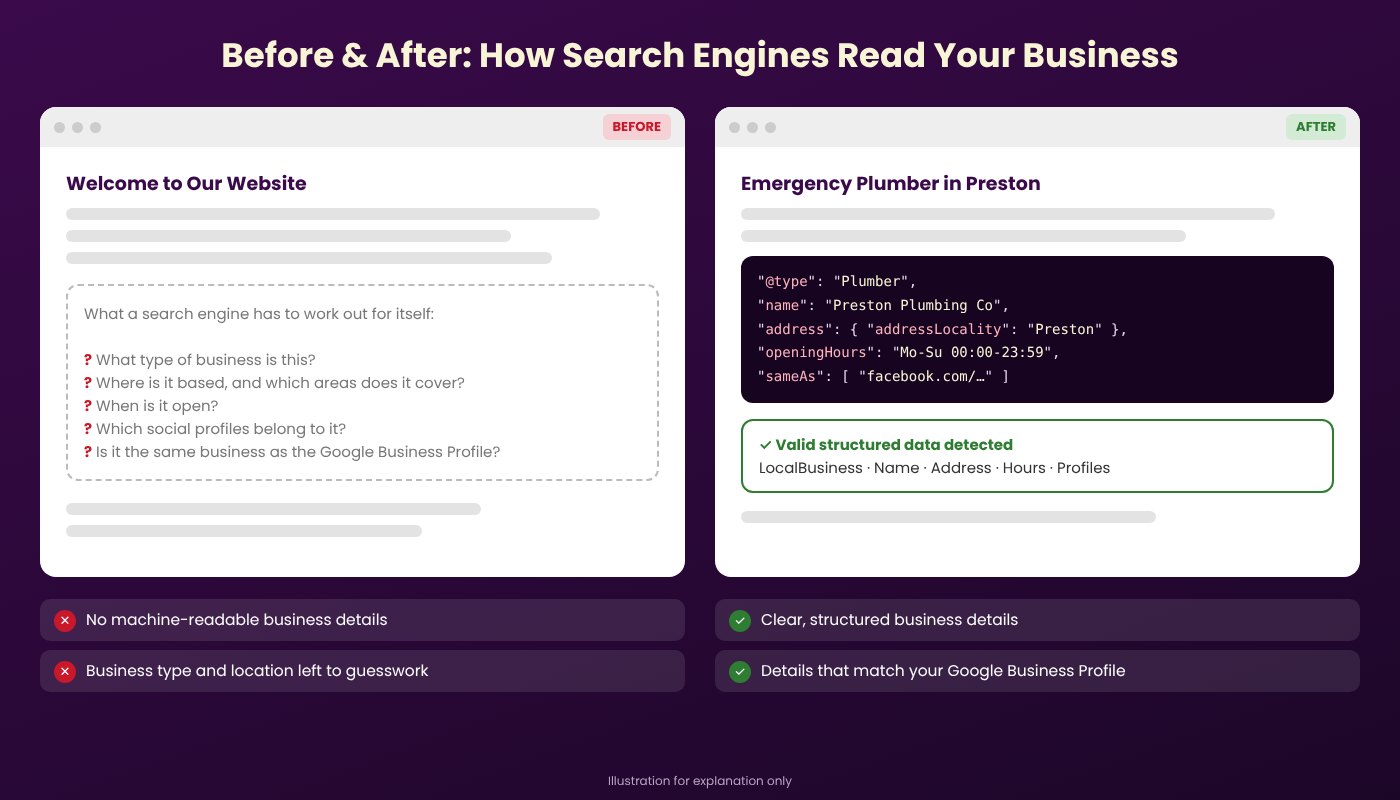
Visitors won’t see any change: schema sits in your site’s code, so your design and content stay exactly as they are.
Schema, On-Page SEO and GEO: How They Fit Together
On-page SEO improves what your page says for Google’s rankings, and GEO makes your content clearer for AI search tools. Schema works behind the scenes, describing your business in a structured format that search engines and AI tools are built to read.
They complement each other well. If your page content also needs work, pair this with WordPress On-Page SEO or Generative Engine Optimisation so your content and your structured data tell the same story.
Schema for Organic, Maps & AI Search
Google Maps. Your website is part of how Google judges the relevance of your Google Business Profile. Schema that matches your profile’s name, address, phone number and hours can help reinforce those local signals for the map pack.
Organic search. Structured data helps Google understand your business and can make your pages eligible for enhanced search features, although Google decides what to show.
AI search. AI search tools draw on information they can interpret clearly. Consistent, structured business details are designed to make your business easier for them to identify and describe.
Schema works best as part of a wider local strategy, as rankings also depend on your profile, your reviews and how well known your business is. Start with Google Business Profile Optimisation, then follow the Local SEO Roadmap with UK Business Directories and Google Map Citations to build consistent listings across the web. For wider authority, add UK Link Building.
Questions Before Ordering
Answers to the most common questions about local schema, including access, what’s added and what to expect.
What is LocalBusiness schema?
It’s a type of structured data, written in a format called JSON-LD, that describes your business to search engines: what you do, where you are, how to contact you and when you’re open. It sits in your site’s code and isn’t visible to visitors.
Will schema give me star ratings or rich results?
It can make your site eligible for some enhanced search features, but Google decides what to show, and review stars generally aren’t shown for reviews a business displays about itself. Think of schema as a way to help Google understand your business rather than a guaranteed visual change.
What access do you need?
An Administrator login for your WordPress site, so the schema and a lightweight plugin can be added. You can create a separate user for me and remove it once the work is delivered.
Will it clash with Yoast, Rank Math or my existing schema?
No. If an SEO plugin already outputs basic schema, your LocalBusiness markup is set up to work alongside it, and your content and design are left untouched.
Do I need a Google Business Profile?
It isn’t essential, but it helps. If you have one, your schema details are matched to it so your website and listing tell Google the same story. If you don’t have one yet, it’s worth setting one up.
Can you add schema for more than one location?
This service is for single-location businesses. Each extra location needs its own schema setup, so get in touch for a custom quote if you have several.
Is this suitable for service-area businesses?
Yes. If you travel to your customers rather than having them visit you, your schema can describe the areas you serve instead of focusing on a public address.
What should I do after delivery?
Request indexing of your homepage in Google Search Console so it’s recrawled sooner, and keep your schema in step with your Google Business Profile if your hours or details change. Then build local signals with the Local SEO Roadmap, starting with Google Business Profile Optimisation.
Pair Schema with On-Page SEO and GEO
Schema tells search engines the facts about your business. On-page SEO sharpens your content for Google's rankings, and GEO makes it clearer for AI search. Together they're designed to give search engines a consistent picture of your business, from the code to the content.
Ready to Give Google the Full Picture?
Send me your website and Google Business Profile, and I’ll write schema that sets out your business details clearly for search engines. Then build on it with on-page SEO, GEO and the Local SEO Roadmap so every side of your local visibility moves forward together.